Find hidden cameras in any room with your iPhone
Camera Detector Ultra turns your iPhone into a hidden camera detector. Scan the WiFi network for unfamiliar devices, sweep for electronics with the magnetometer, and reveal lens reflections with infrared detection — before you unpack in a hotel room, Airbnb, or rental.
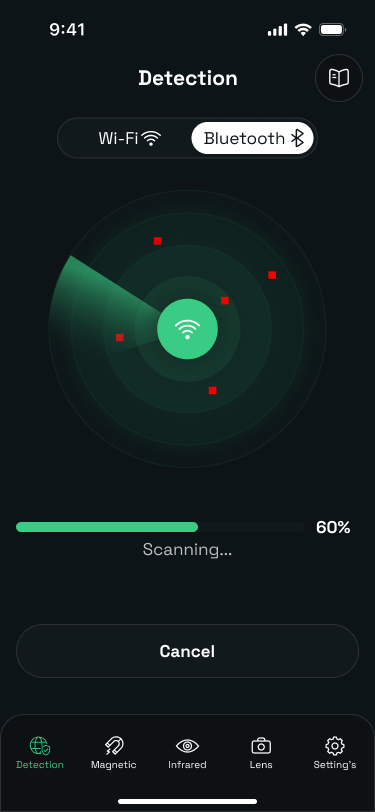
Camera Detector Ultra is an iPhone app that helps you inspect hotel rooms, Airbnbs, offices, and other private spaces for hidden cameras. It uses three of your phone's built-in sensors — WiFi, the magnetometer, and the camera with infrared analysis — to surface devices and reflections that are easy to miss with the naked eye. It is an inspection aid: it highlights what deserves a closer look and pairs each scan with guidance on where cameras are commonly hidden.
Three detection methods, one sweep
Hidden cameras hide in different ways. The app layers network, magnetic, and optical detection so one method's blind spot is covered by another.

WiFi Network Scanner
Lists every device connected to the local WiFi network so you can flag unfamiliar hardware — many consumer spy cameras stream over the room’s own network.
Limit: Cannot see cameras that are offline or recording locally to a memory card.

Magnetometer Sweep
Uses the iPhone’s magnetometer to notice unusual magnetic field readings near objects, fixtures, and wall areas that could conceal electronics.
Limit: Works at close range (a few centimeters); sweep slowly and methodically.

Infrared Lens Detection
Helps reveal lens-like reflections and infrared LEDs that stand out in darkened rooms — the tell-tale glint of a camera lens pointed your way.
Limit: Best in a fully darkened room; check from multiple angles.
How to check a room for hidden cameras
- Scan the network. Join the room's WiFi and run the network scan. Review the device list and flag anything you don't recognize — consumer spy cameras often show up with generic or IP-camera names.
- Sweep with the magnetometer. Move your phone slowly along walls, fixtures, and suspicious objects. Spikes in the magnetic field reading suggest concealed electronics worth inspecting.
- Check for lens reflections. Darken the room and use the infrared scanner. Camera lenses and IR night-vision LEDs reflect light in a way that stands out against ordinary surfaces.
- Finish with a physical inspection. Check the common hiding spots below by hand — no scan replaces a careful look at anything pointed at a bed or bathroom.
Where hidden cameras are most commonly found
- Smoke detectors and ceiling fixtures
- Alarm clocks and clock radios
- USB chargers, power adapters, and power strips
- WiFi routers and set-top boxes
- Air purifiers and speakers
- Picture frames, mirrors, and shelf decor
- Wall outlets and light switches
- Anything with a clear line of sight to beds or bathrooms
Free checking tools
No-signup tools that run in your browser — use them alongside the app or on their own.
Room Check Checklist
A tap-through checklist for sweeping a hotel room or Airbnb — every spot to inspect and every phone check to run, with progress tracking and a printable version.
↗WiFi Device Name Checker
Paste the device list from your network scan or router and instantly flag names that match known camera brands and streaming-device patterns.
↗Hidden camera guides
Step-by-step guides for travelers, renters, and anyone who values their privacy.
How to Find Hidden Cameras in an Airbnb
The 7-step room check to run before you unpack — where cameras hide, what Airbnb’s rules say, and what to do if you find one.
↗ How-ToHow to Detect Hidden Cameras With Your iPhone
Your iPhone already has the sensors of a basic camera detector. How to use the WiFi scan, magnetometer, camera, and flashlight properly.
↗ ExplainerDo Hidden Camera Detector Apps Actually Work?
An honest look at what detector apps can and can’t find — and how to combine an app scan with a physical inspection that actually catches devices.
↗Frequently asked questions
Do hidden camera detector apps really work?
Detector apps are a useful first-pass tool, not a guarantee. They surface signals your eyes miss — unfamiliar devices on the WiFi network, magnetic field anomalies near electronics, and lens reflections under infrared light. For a thorough sweep, combine an app scan with a careful physical inspection of common hiding spots.
How does Camera Detector Ultra find hidden cameras?
It combines three on-device methods: a WiFi network scanner that lists devices connected to the local network so you can spot unfamiliar hardware, a magnetometer sweep that reads magnetic field changes near hidden electronics, and an infrared scanner that helps reveal lens reflections and IR light sources in darkened rooms.
Can the app detect cameras that are turned off or not on WiFi?
Cameras that are powered off or record locally without a network connection will not appear in a WiFi scan. That is why the app includes magnetometer and infrared lens-reflection tools, which do not depend on the camera being connected — and why we always recommend finishing with a physical inspection.
Where are hidden cameras most commonly placed?
The most common spots are smoke detectors, alarm clocks, USB chargers and power adapters, air purifiers, routers, picture frames, shelf decor, and anywhere with a clear line of sight to beds and bathrooms. Check objects that point at private areas or that look out of place.
Is Camera Detector Ultra free?
The app is free to download on the App Store, with optional premium features available by subscription.
What should I do if I find a hidden camera?
Do not touch or unplug the device — it may be evidence. Document it with photos and video, move out of its view, contact local police, and report the listing to the platform (Airbnb, Vrbo, or the hotel chain). Recording guests in private spaces is illegal in most jurisdictions.
Check your room before you unpack
Camera Detector Ultra combines a WiFi network scanner, magnetometer sweep, and infrared lens detection — the three checks that catch most consumer spy cameras. Run your first sweep in minutes.